




















Samsung Oven Not Cooking Evenly? Causes, Safe Checks and Fixes
Burnt on one side, raw on the other? Start with the racks, pans and a thermometer test, then find out which faults need a technician.
On this page
Quick answer
A Samsung oven not cooking evenly usually has a setup issue (foil, crowded racks, dark pans, no room around the food) or a temperature that's off. Test it with an oven thermometer and use Samsung's calibration setting for a steady error. If one side still burns, a convection fan, bake element or sensor fault needs a technician.
Key takeaways
- Rule out the setup first: no foil on the floor or racks, one center rack, light pans, and room around each pan.
- An oven thermometer on the center rack tells you whether the whole oven is off or just one side.
- Check your manual for Temp Adjust. Samsung documents ±35°F on one range, which fixes a small, steady error.
- A convection fan that won't turn, a blistered bake element or a drifting sensor are the usual hardware causes.
- Call a technician if an element sparks or glows in one spot, the fan never turns, or you smell gas from a gas oven.
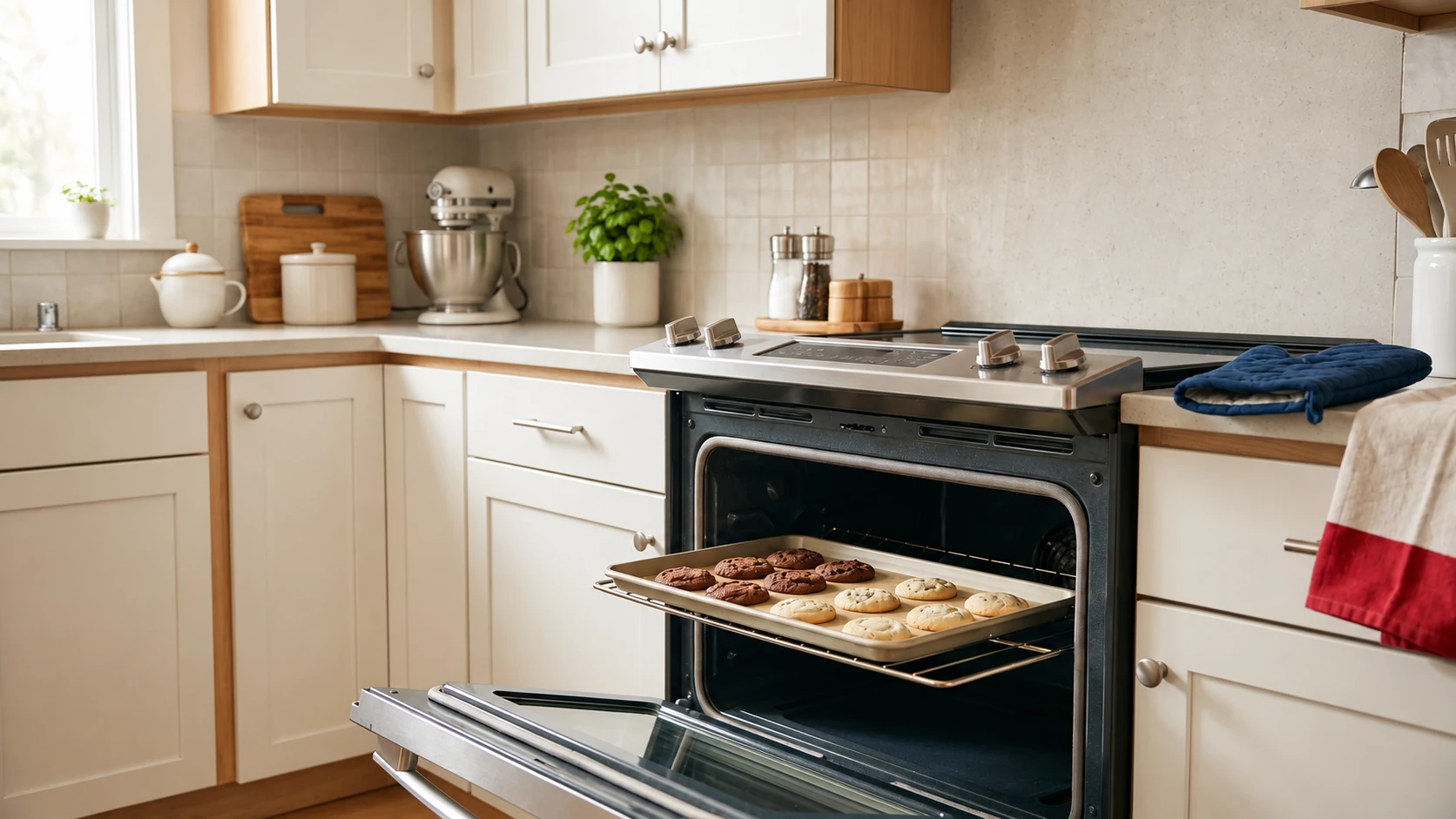
The cookies at the back of the tray are dark brown, the ones at the front are pale, and the casserole is bubbling on one side only. If your Samsung oven is not cooking evenly, the cause is often something you can find in 15 minutes, and sometimes it's a part.
We repair Samsung ovens and ranges, gas and electric, and the pattern on the tray usually tells us where to look. If the checks below don't solve it, our oven repair service comes to your home, 7 days a week.
Why a Samsung oven cooks unevenly
Even cooking depends on three things: heat coming in evenly, air moving around the food, and the oven knowing its own temperature. When one of them is off, the tray shows it.
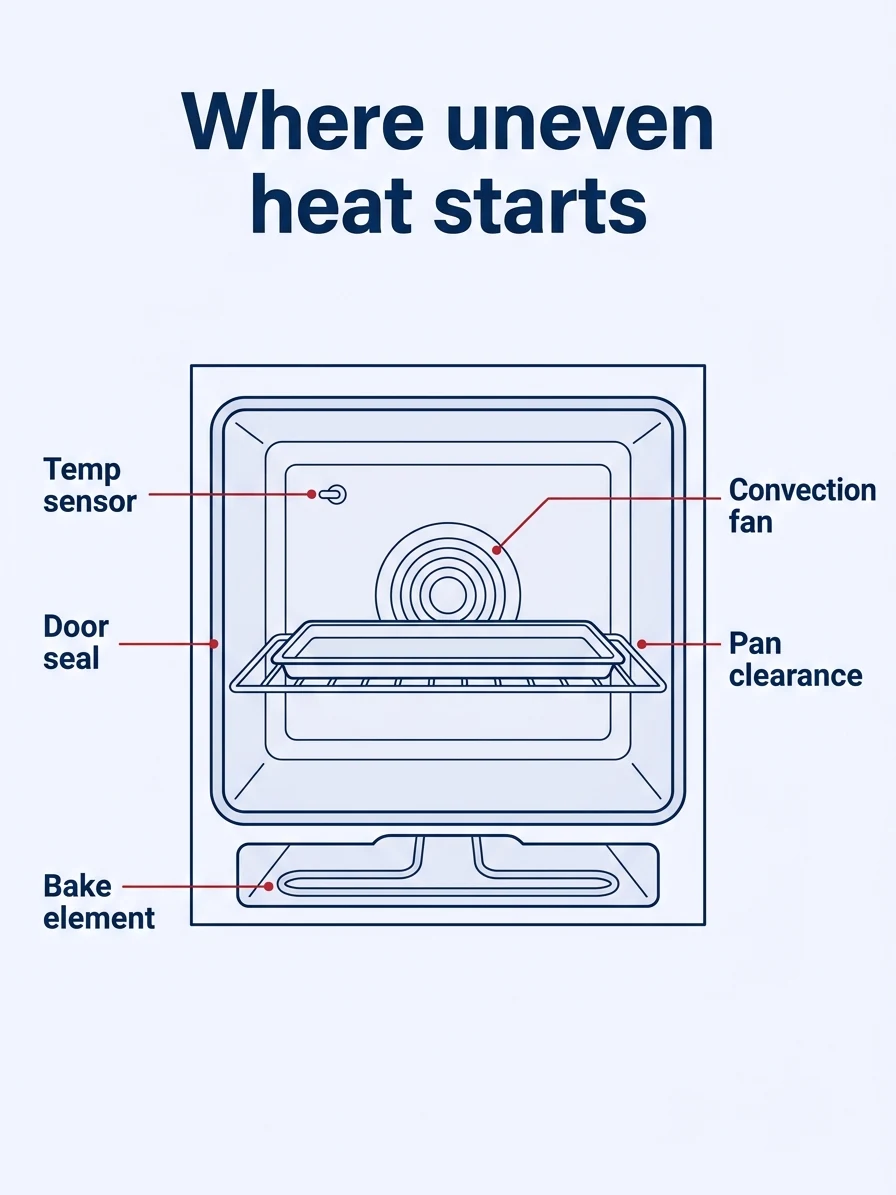
| What you see | Likely cause | Safe check | Call a pro? |
|---|---|---|---|
| One side or the back browns faster | Pans too close to the walls, convection fan not turning, element hot spot | 2 inches around pans; watch for the fan in convection mode | Yes, if the fan never turns |
| Everything overcooked or undercooked | Temperature off (calibration or sensor) | Oven thermometer test, then Temp Adjust | Yes, if it's far off or keeps changing |
| Bottoms burn, tops stay pale | Rack too low, dark pans, foil on the oven floor | Center rack, remove foil, lighter pans | No |
| Top rack fine, bottom rack not | Two crowded racks blocking airflow | Stagger pans, or bake one rack at a time | No |
| Slow preheat, then uneven results | Weak bake element (electric) or bake burner (gas) | Time the preheat; look for a glowing or blistered spot | Yes |
| Front of the tray pale | Worn door gasket or door not closing flush | Check that the gasket is whole and the door shuts flat | Yes, if the gasket is torn |
Safe checks for a Samsung oven that cooks unevenly
Start with the setup. These checks cost nothing, and a rack, a pan or a sheet of foil is behind plenty of uneven trays.
Safe checks you can do first
- Turn the oven off and let it cool. Steps 2 to 6 are done cold. Don't reach near the elements or remove any panel.
- Take out the foil. Samsung doesn't recommend aluminum foil in the oven because it can block airflow, melt or damage the oven, and its self-clean instructions say foil can ignite. Whirlpool's uneven browning guide says not to cover a whole rack or the oven bottom with foil, because it blocks airflow.
- Use one rack in the middle. Remove racks you aren't using and center the pan. Samsung says to leave at least 1 inch of space around each item, especially with convection (Samsung, oven temperature issues). Whirlpool suggests 2 inches between a pan and the oven walls, which is a good target.
- Look at your pans. Samsung says dark pans absorb and retain more heat than light pans and are more likely to burn around the edges. If the edges burn first, swap in a light, shiny pan before blaming the oven.
- Check that the range is level. Set a small level on the center rack, side to side and front to back. Samsung's range setup guide says the leveling legs raise or lower the range. On a gas range, don't pull it away from the wall to reach them; that's a job for a technician.
- Check the Flex Duo divider. If your Samsung range has Flex Duo, the divider splits the oven into upper and lower compartments with their own settings. Bake in the full oven with the divider out unless the recipe suits a single compartment.
- Watch the convection fan. With the other checks done, set a convection mode, close the door and look through the window or listen at the back wall. The fan should turn within a minute or so of the oven heating.
Don't lower the temperature twice in convection. Samsung says Auto Conversion, which is on by default, reduces any temperature you enter by 25°F when you use convection cooking. If you also knocked 25°F off the recipe yourself, the food gets 50°F less heat than the recipe expects and comes out pale and underdone, which can look like uneven cooking. Check your manual for whether Auto Conversion is on.
Test the temperature and adjust it
Now find out whether the whole oven is off or just one side. Two tests answer it.
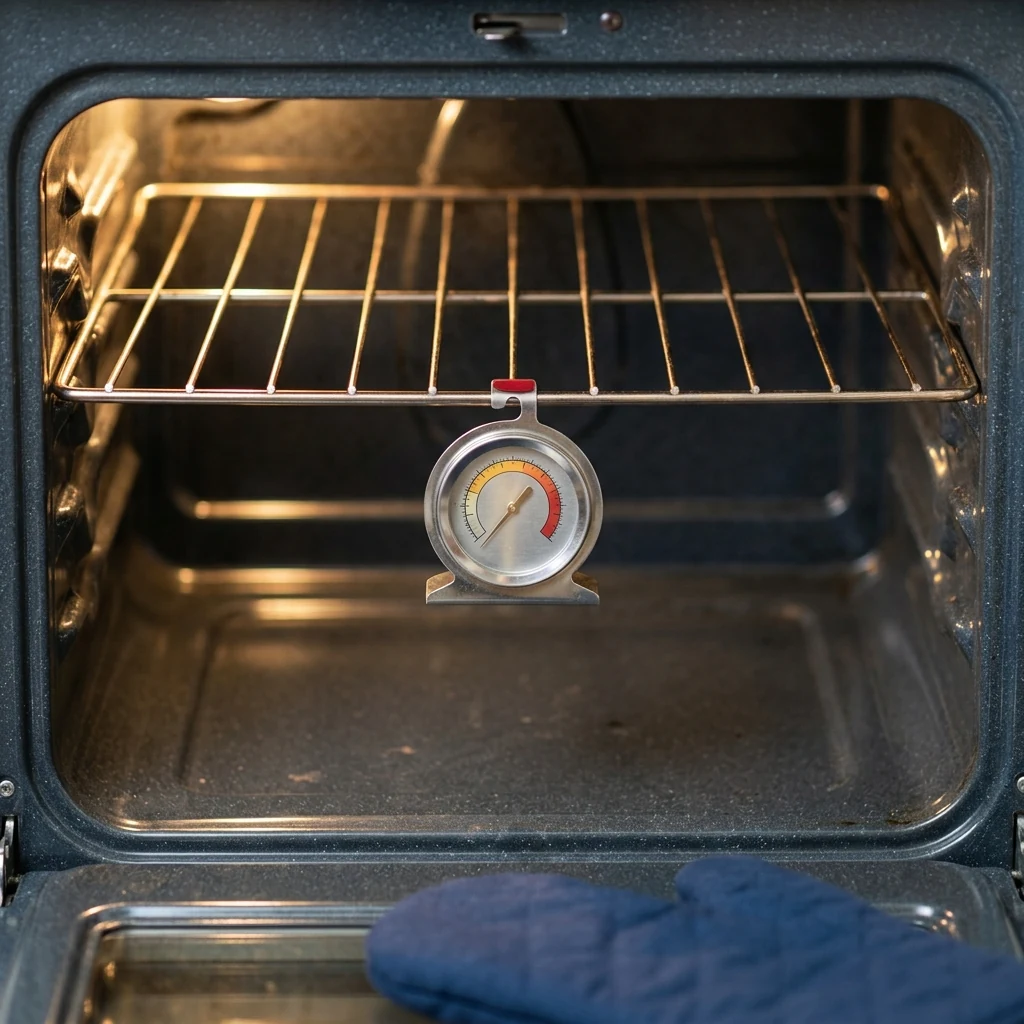
The thermometer test. Hang an oven thermometer from the center rack, set the oven to 350°F, and wait about 20 minutes after the preheat signal.
Read it three or four times, 10 minutes apart, without opening the door longer than you need to. Ovens cycle above and below the set point, so look at the average.
Samsung says an oven set to 350°F usually ranges between 330°F and 370°F while cooking, and that cheap oven thermometers aren't highly accurate. That is a 20°F swing either way, so a reading inside that band is normal cycling, not a fault.
The toast test. Cover a light baking sheet with slices of white bread, put it on the center rack at 350°F and check it after about 10 minutes. The browning pattern shows where the hot spots are.
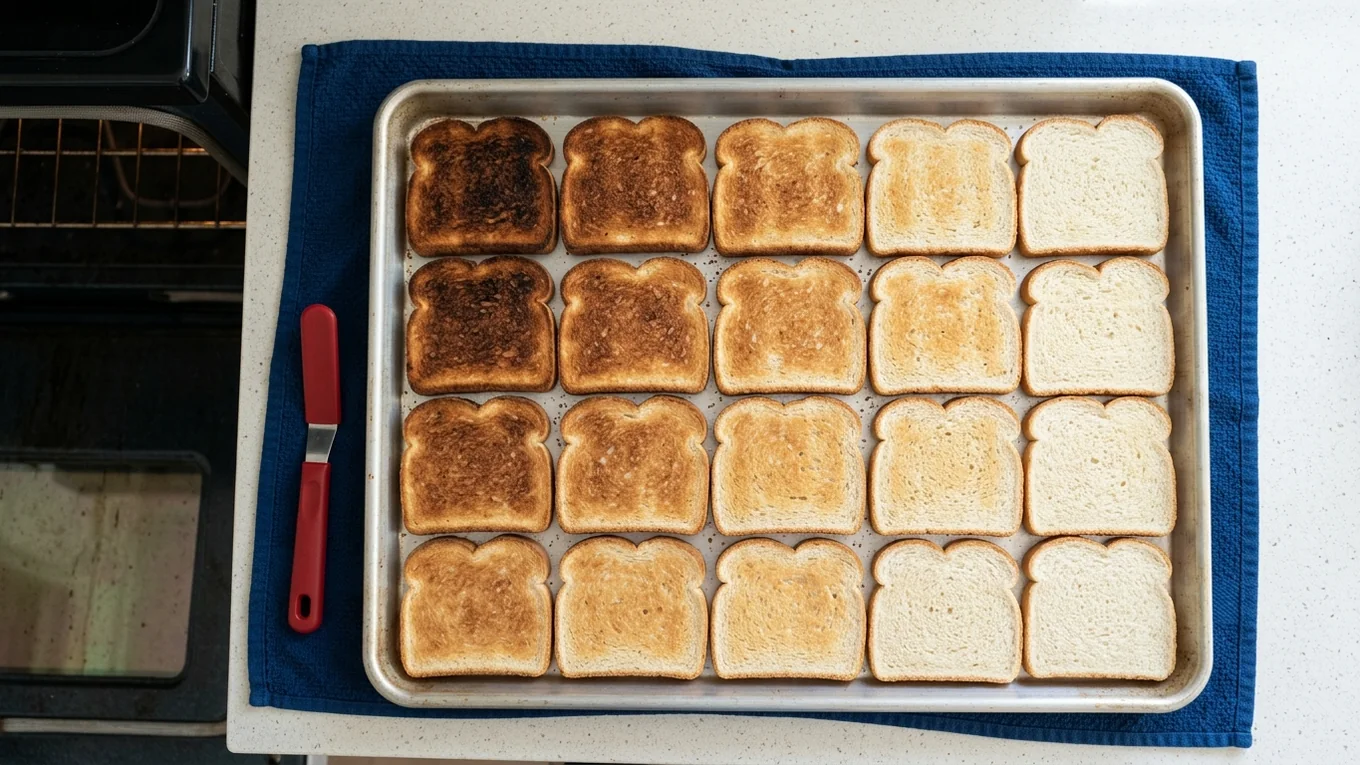
What the results mean:
- Average off by a steady amount, toast browns evenly. The oven is consistent but miscalibrated. Samsung's Temp Adjust instructions for one range say the oven temperature can be adjusted by plus or minus 35°F. On that model you hold Clock/Setting for 3 seconds, choose the adjustment and save it with START/SET. The buttons differ by model, so follow your manual.
- Average fine, toast dark on one side. The temperature is right but the heat isn't spreading. That points to airflow (the setup above, or the convection fan) or an element hot spot.
- Reading swings widely or keeps changing. A drifting temperature sensor or a control fault. Adjusting won't hold.
One detail can look like a fault: in Sabbath mode, Samsung says the temperature display on that range doesn't start to change until the oven reaches 175°F. A display that sits still early in a Sabbath bake isn't a fault on its own.
In Chicago, the gas utility is Peoples Gas. Elements, fans, sensors and gas burners sit behind panels with live wiring or gas connections, so the repairs below are technician work.
Convection fan, bake element and sensor faults
When the setup is right and the toast test still shows a hot side, one of these parts is usually the cause.
Convection fan
The fan at the back wall pushes hot air around the food. If its motor fails or the blade is damaged, heat pools near the element and the far side of the tray lags behind. It shows up most on convection modes, and a failing fan can grind or squeal before it stops.
Bake element or gas bake burner
On electric ovens, a bake element with a weak section heats unevenly and slows the preheat. Many ranges hide the element under a smooth oven floor, so you won't see it.
On gas ovens, a weak igniter lets the bake burner light late, so the oven spends longer below temperature even though the display looks right. Don't remove the oven floor panel on a gas oven: the burner and gas parts are below it.
If burners click but won't light, our guide to a gas stove not working covers the cooktop side, and our range repair covers gas, electric and dual-fuel ranges.
Slow preheat and low voltage
Samsung says preheating to 350°F with one empty rack should finish within 20 minutes. If an electric range takes much longer and then bakes unevenly, the supply voltage is worth checking. Samsung notes that electric ranges require 240V and that a lower voltage lengthens the preheat time. Checking voltage means working at the panel or the outlet, so that's a job for an electrician or a technician, not a homeowner test.
Temperature sensor and control
The sensor on the back wall tells the control how hot the oven is. If it drifts, the oven runs hot or cold, and the error can change from day to day. A technician tests the sensor's reading against the oven's real temperature before replacing anything.
First comes the service call, a fair, upfront fee set by your location and appliance and confirmed with you before the technician heads out. You get a written estimate before any work, and if you decide not to repair it, you pay only the service call and we give you the part number. We repair Samsung appliances of every type, from ovens to Samsung refrigerators that stop cooling.
How to keep baking even
On an oven with no failed part, even baking comes down to habits:
- No foil on the oven floor or racks. Put a pan on the rack below to catch drips instead.
- One rack for most baking. Whirlpool notes most baked goods do best on a single rack. With two racks, space them evenly.
- Watch pan color. Dark pans brown faster than light, shiny ones, so a dark pan on a low rack burns bottoms.
- Keep the oven clean the right way. Samsung says commercial oven cleaners and liners are not to be used inside its ovens. Our guide to deep cleaning appliances covers oven-safe methods.
- Keep the door shut. Every opening drops the temperature and lengthens the bake.
If the oven isn't heating at all, rather than unevenly, see our guide to an oven not heating, which walks through the same parts from a different symptom.
Frequently asked questions
Why is my Samsung oven cooking unevenly?
Usually because of the setup or the temperature. Foil on the oven floor, crowded racks or pans too close to the walls block airflow. If the setup is right, an oven thermometer and a toast test show whether the temperature is off or one side runs hot. A hot side that won't go away points to the convection fan, the bake element or burner, or the sensor.
How do I calibrate my Samsung oven temperature?
Check your manual for a Temp Adjust setting. On the range Samsung documents, you hold Clock/Setting for 3 seconds, choose the adjustment, set a value between minus 35 and plus 35°F, and save it with START/SET. The buttons vary by model. Test with an oven thermometer before and after.
Why does my Samsung oven not heat past 175°F?
On the Samsung range documented here, a Sabbath bake doesn't change the display until the oven reaches 175°F, so a still display early on is normal in that mode. If you aren't in Sabbath mode and the oven really stays cool, a failed bake element on an electric model or an igniter or burner problem on a gas model is likely. Both need a technician.
Do I need to lower the temperature when I use convection on a Samsung oven?
Not usually. Samsung says Auto Conversion is enabled by default and reduces any entered temperature by 25°F in convection cooking. If you lower the temperature yourself as well, the oven runs 50°F under the recipe and food comes out pale. Check your manual to see whether Auto Conversion is on, and leave the recipe temperature alone if it is.
Should I rotate pans in an uneven oven?
Rotating a pan halfway through helps a little, and it's fine for a delicate bake. But if you have to rotate every time, something is wrong. Check the foil, rack position and pan clearance first, then run the thermometer and toast tests. A healthy oven with a working convection fan shouldn't need constant rotating.
Is uneven baking a sign my oven is dangerous?
Not by itself. Most uneven baking is a setup issue, a calibration error or a worn part. It becomes a safety issue if an element sparks or glows in one spot, the oven trips the breaker, or a gas oven's burner lights slowly or you smell gas. If you smell gas, leave the home, then call 911 and Nicor Gas from outside.
Is it worth repairing a Samsung oven that cooks unevenly?
Often, yes. A convection fan motor, a bake element or a temperature sensor is typically a single-part repair, and the rest of the oven is often fine. Age and the condition of the control board matter more. A technician can test the part and tell you honestly whether the repair is worth it.
What to do next
Start with the setup tonight: foil out, one center rack, 2 inches around the pan. Then run the thermometer and toast tests. A steady error is a Temp Adjust fix; a hot side that won't go away is a part.
If the fan, element, burner or sensor is the cause, book our in-home oven repair. We're out 7 days a week across Aurora and 30+ nearby cities, and same-day service is available.
Sources
- Samsung US Support: Temp Adjust and oven control panel (NE63*611*S*): On this range the oven temperature can be adjusted plus or minus 35 degrees F; steps (hold Clock/Setting 3 seconds, select 1, choose the adjustment, START/SET); in a Sabbath bake the temperature display starts to change once the oven reaches 175 degrees F (Sabbath mode only). The page has no uneven-cooking troubleshooting.
- Samsung US Support: Install your Samsung gas or electric range: Raise or lower the leveling legs so the range is level with the floor; Flex Duo lets the upper and lower compartments use different settings
- Samsung Canada Support: How to clean your Samsung oven: Self Clean warnings: make sure the oven is free of excessive spillage and aluminum foil, which can cause damage or ignite; commercial oven cleaners or liners inside the oven are strictly prohibited (Samsung Canada page; no US equivalent found)
- Whirlpool Product Help: Uneven browning (Range): Allow 2 inches of clearance around pans and the oven walls; do not cover an entire rack or the oven bottom with foil below the pan; dark pans absorb heat and brown more; most baked goods do best on a single rack; a bake performance test shows whether calibration is needed
- Samsung US Support: Samsung oven temperature issues: Auto Conversion on by default reduces entered temperature by 25 degrees F in convection; dark pans burn edges; at least 1 inch of space around each item; no foil because it blocks airflow; calibration up to 35 degrees F; preheat to 350 within 20 minutes; electric ranges need 240V and low voltage lengthens preheat; a 350 degree oven ranges about 330 to 370 degrees; consumer thermometers are not highly accurate
Written by
About us
MS Appliance Repair Services
Honest Repairs, Right at Home
Rated 5 stars on Google by 190+ homeowners in the Chicago suburbs
- Open 7 days, 8 AM to 7 PM
- Same-day service available
- 5-star Google rating from 190+ reviews
- 90-day limited parts and labor warranty on qualifying repairs
- LG-authorized
Serving Aurora, Naperville, Plainfield and 30+ cities across the Chicago suburbs.
Keep reading
All articles →
Frigidaire Oven Not Heating? Safe Checks for Gas and Electric
Display on, oven cold? Start with the breaker and the settings, then the bake element or igniter. Safe checks for gas and electric Frigidaire ovens.
Gas Stove Not Working? Safe Checks, Symptom by Symptom
Burner clicks but won't light, or won't click at all? Safe checks for caps, ports, moisture and power, plus the gas signs that mean leave and call.
Professional vs. DIY Appliance Repair: What You Can Fix Yourself
What you can safely fix yourself on each appliance, the 4 hard lines that need a technician, and the hidden cost of buying parts on a guess.